React Components Explained
Components are the heart of every React application.
Whether you're building a simple portfolio website, an e-commerce store, or a complex dashboard, everything in React is built using components.
Instead of writing one large HTML page, React encourages developers to divide the user interface into small, reusable pieces called components.
This approach makes applications easier to build, maintain, test, and scale.
In this guide, you'll learn what React components are, why they're important, the different types of components, and how to create reusable user interfaces using modern React.
What is a React Component?
A React component is a reusable piece of the user interface.
Think of a component as a small building block.
Examples include:
- Navigation Bar
- Header
- Footer
- Login Form
- Product Card
- Search Bar
- Shopping Cart
- Sidebar
- User Profile
- Button
Each component is responsible for displaying a specific part of the application.
Instead of repeating the same HTML multiple times, you create a component once and reuse it wherever needed.
Why Do We Use Components?
Imagine you're building an e-commerce website.
Every product needs a product card.
Without components, you would write the same HTML repeatedly.
textProduct 1 Product 2 Product 3 Product 4 Product 5
If the design changes, you would have to update every product card manually.
With React components, you create one reusable ProductCard component.
text<ProductCard/> <ProductCard/> <ProductCard/> <ProductCard/> <ProductCard/>
Now, updating the component automatically updates every product card throughout the application.
This saves time, reduces duplication, and keeps your code consistent.
Real-World Example
Consider a typical website.
text-------------------------------- Header -------------------------------- Navigation -------------------------------- Hero Banner -------------------------------- Services -------------------------------- Testimonials -------------------------------- Footer --------------------------------
In React, each section becomes its own component.
text<App> <Header/> <Navbar/> <Hero/> <Services/> <Testimonials/> <Footer/> </App>
This structure is much easier to understand than one large HTML file containing everything.
Types of React Components
Modern React primarily uses Functional Components.
Older React applications may still contain Class Components, but new projects should generally use Functional Components.
Functional Components
A functional component is simply a JavaScript function that returns JSX.
Example:
jsxfunction Welcome(){ return( <h1> Welcome to React </h1> ); } export default Welcome;
This is the recommended approach for modern React development.
Arrow Function Components
Many developers prefer arrow functions.
Example:
jsxconst Welcome=()=>{ return( <h1> Welcome to React </h1> ); }; export default Welcome;
Both styles are valid.
Choose one style and use it consistently throughout your project.
Class Components
Before React Hooks were introduced, class components were commonly used.
Example:
jsximport React,{Component} from "react"; class Welcome extends Component{ render(){ return( <h1> Welcome to React </h1> ); } } export default Welcome;
Although you may encounter class components in older projects, most modern React applications use functional components because they are simpler and work seamlessly with Hooks.
Creating Your First Component
Create a new file.
textsrc/components/Header.jsx
Add the following code.
jsxfunction Header(){ return( <header> <h1> Paridhi Solutions </h1> </header> ); } export default Header;
Now import the component into App.jsx.
jsximport Header from "./components/Header"; function App(){ return( <Header/> ); } export default App;
Save the file.
Your browser will immediately display the header thanks to Vite's Hot Module Replacement.
Naming Components
React components should always begin with a capital letter.
✅ Correct
textHeader Navbar Footer ProductCard UserProfile
❌ Incorrect
textheader navbar footer
React treats lowercase names as HTML elements.
Using uppercase names tells React that you're rendering a custom component.
Importing Components
After creating a component, you need to import it before you can use it.
Suppose you have the following component:
textsrc/components/Header.jsx
Import it into another component.
jsximport Header from "./components/Header"; function App() { return ( <> <Header /> </> ); } export default App;
React treats imported components like custom HTML elements.
Exporting Components
Components must be exported before they can be imported elsewhere.
Most React projects use Default Export.
Example:
jsxfunction Header() { return ( <header> <h1>Paridhi Solutions</h1> </header> ); } export default Header;
Then import it like this:
jsximport Header from "./components/Header";
Named Exports
React also supports named exports.
Example:
jsxexport function Header() { return ( <h1>Header</h1> ); }
Import it using curly braces.
jsximport { Header } from "./components/Header";
Named exports are useful when multiple functions or components exist in the same file.
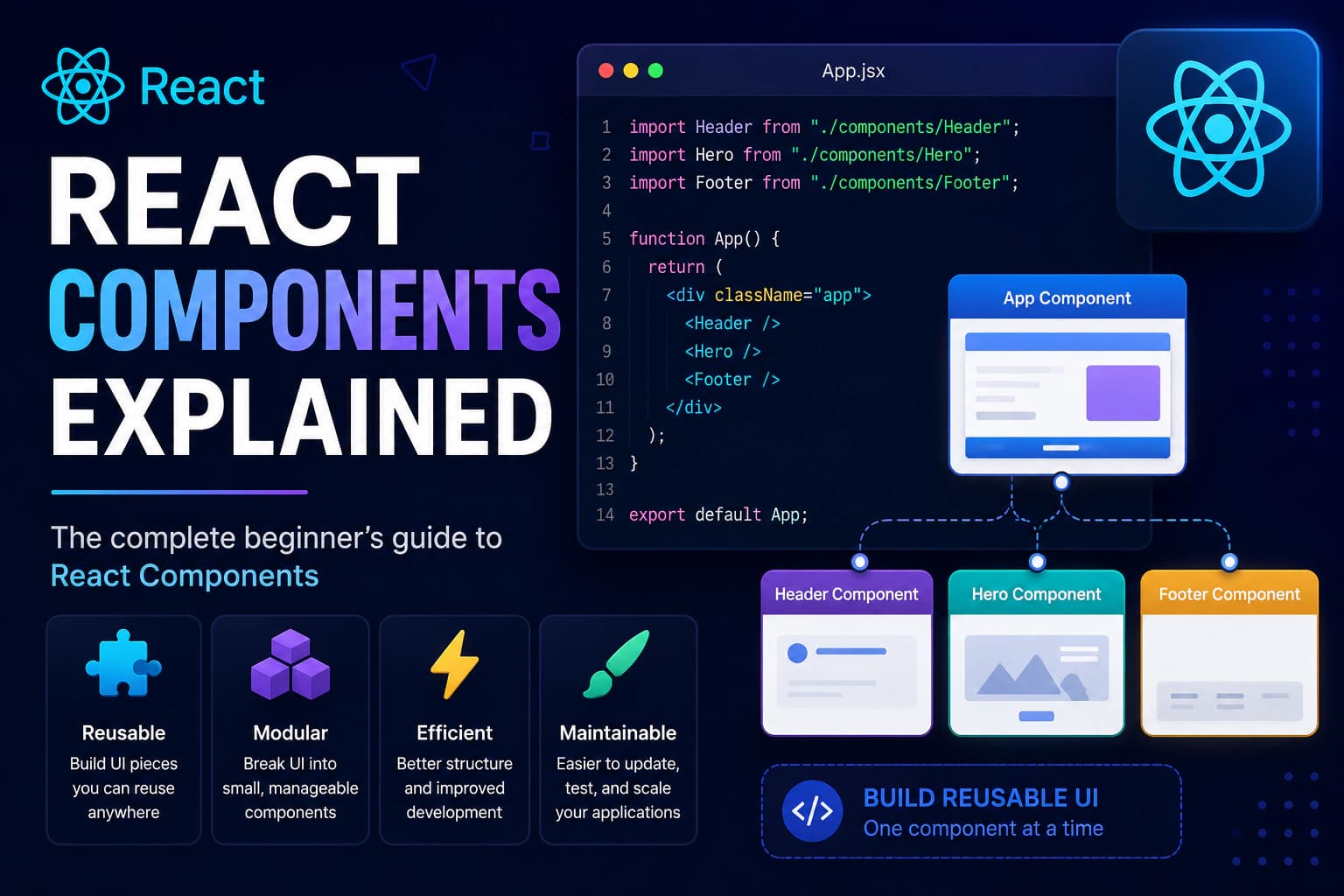
Component Composition
One of React's biggest strengths is Component Composition.
Instead of creating one huge component, combine many smaller components together.
Example:
textApp │ ├── Header ├── Navbar ├── Hero ├── Services ├── Testimonials └── Footer
Code:
jsxfunction App() { return ( <> <Header /> <Navbar /> <Hero /> <Services /> <Testimonials /> <Footer /> </> ); }
This approach makes applications much easier to understand and maintain.
Nested Components
Components can contain other components.
Example:
jsxfunction Card() { return ( <div> <CardHeader /> <CardBody /> <CardFooter /> </div> ); }
The component hierarchy becomes:
textCard │ ├── CardHeader ├── CardBody └── CardFooter
This technique is used extensively in modern React applications.
Reusable Components
The primary goal of components is reusability.
Suppose your website contains dozens of buttons.
Instead of writing:
html<button>Save</button>
multiple times, create a reusable component.
jsxfunction Button() { return ( <button> Save </button> ); }
Now use it wherever needed.
jsx<Button /> <Button /> <Button />
Changing the component automatically updates every button throughout the application.
Components vs HTML Elements
HTML elements are built into the browser.
Examples include:
html<div> <h1> <p> <img> <button>
React components are custom elements created by developers.
Example:
jsx<ProductCard /> <Header /> <Footer /> <LoginForm />
Components can internally contain many HTML elements.
For example:
jsxfunction ProductCard() { return ( <div className="card"> <img src="/product.jpg" alt="Product" /> <h2>Wireless Mouse</h2> <p>$29.99</p> <button>Add to Cart</button> </div> ); }
Although this appears as a single component, it renders multiple HTML elements.
Splitting Large Components
Avoid creating very large components.
For example:
❌ Bad
textDashboard.jsx 1000+ lines
Instead:
textDashboard │ ├── Sidebar ├── Header ├── Statistics ├── Charts ├── Orders └── Footer
Smaller components are easier to read, debug, and test.
Organizing Components
As your project grows, organize components into folders.
Example:
textcomponents/ Button/ Button.jsx Button.css Navbar/ Navbar.jsx Navbar.css Footer/ Footer.jsx Footer.css
Keeping related files together makes projects much easier to navigate.
Presentational vs Container Components
Many React applications separate components into two categories.
Presentational Components
These focus on displaying data.
Examples:
- Button
- Card
- Header
- Footer
- ProductCard
They contain little or no business logic.
Container Components
These handle application logic.
Examples:
- API requests
- State management
- Data fetching
- Event handling
They often pass data to presentational components using props.
This separation improves maintainability in larger applications.
Best Practices for Components
Follow these recommendations when building React components.
Keep Components Small
A component should perform one clear responsibility.
Reuse Components
Avoid copying and pasting JSX.
Create reusable components whenever possible.
Use Descriptive Names
Choose names that clearly describe the component.
Examples:
textShoppingCart UserProfile OrderSummary PricingCard
One Component Per File
Keeping each component in its own file makes navigation and maintenance much easier.
Keep Business Logic Separate
Move API calls, utility functions, and data processing into dedicated files whenever possible.
This keeps components focused on rendering the user interface.
Common Beginner Mistakes
Creating Huge Components
Large files become difficult to understand.
Split them into smaller components.
Forgetting to Export Components
Without an export statement, components cannot be imported elsewhere.
Incorrect Import Paths
Always verify your import path.
Correct:
jsximport Header from "./components/Header";
Incorrect paths will produce build errors.
Using Lowercase Component Names
Incorrect:
jsx<header />
Correct:
jsx<Header />
React treats lowercase names as HTML elements.
Smart Components vs Presentational Components
As React applications grow, developers often separate components based on their responsibilities.
Although this pattern isn't mandatory, it helps keep applications organized and easier to maintain.
Presentational Components
Presentational components focus only on displaying data.
They typically:
- Render the user interface
- Receive data through props
- Contain little or no business logic
- Are highly reusable
Example:
jsxfunction UserCard() { return ( <div> <h2>John Doe</h2> <p>Frontend Developer</p> </div> ); }
Smart Components
Smart components (also called Container Components) manage application logic.
They typically:
- Fetch data from APIs
- Manage state
- Handle user interactions
- Pass data to presentational components
Example:
jsxfunction Users() { const users = [ "John", "Alex", "Sophia" ]; return ( <> {users.map((user) => ( <UserCard key={user} /> ))} </> ); }
Keeping business logic separate from UI often makes large applications easier to test and maintain.
Component Lifecycle (Modern React)
Every React component goes through a lifecycle.
The simplified lifecycle looks like this:
textComponent Created ↓ Component Rendered ↓ Component Updated ↓ Component Removed
With functional components, React Hooks such as useEffect are commonly used to run code during these lifecycle stages.
We'll explore Hooks in detail later in this learning path.
Building Applications with Components
A modern React application is simply a collection of components working together.
Example:
textApp │ ├── Header ├── Navbar ├── Hero ├── Features ├── Pricing ├── Testimonials ├── FAQ ├── Contact └── Footer
Each component is responsible for a small part of the user interface.
This modular approach makes applications easier to develop, test, and extend.
Why Components Are Powerful
React components provide several advantages.
Reusability
Create once.
Use anywhere.
Maintainability
Updating one component automatically updates every place where it is used.
Better Team Collaboration
Multiple developers can work on different components simultaneously.
Easier Testing
Small components are much easier to test than one large application file.
Scalability
As projects grow, components keep the codebase organized and manageable.
Real-World Example
Consider an online shopping website.
Instead of creating every page manually, developers build reusable components.
textHomepage │ ├── Header ├── Navbar ├── ProductCard ├── ProductCard ├── ProductCard ├── Newsletter └── Footer
The same ProductCard component can be reused across:
- Home Page
- Category Page
- Search Results
- Related Products
- Wishlist
This dramatically reduces duplicate code.
Frequently Asked Questions
What is a React Component?
A React component is a reusable piece of the user interface written in JavaScript that returns JSX.
Why are components important?
Components make applications easier to build, maintain, test, and reuse.
Can one component use another component?
Yes.
Components are designed to be nested inside other components.
Example:
jsx<App> <Header /> <Navbar /> <Footer /> </App>
Should every component have its own file?
For small examples, multiple components can exist in one file.
For real-world applications, placing each component in its own file is considered a best practice.
Can components have CSS?
Yes.
Common approaches include:
- CSS Files
- CSS Modules
- Tailwind CSS
- Styled Components
Can components contain JavaScript?
Absolutely.
Components are JavaScript functions, so they can contain variables, functions, loops, conditions, and event handlers.
Summary
In this guide, you learned:
- What React components are
- Why components are important
- Functional Components
- Arrow Function Components
- Class Components
- Importing and Exporting Components
- Component Composition
- Nested Components
- Reusable Components
- Folder Organization
- Best Practices
- Common Beginner Mistakes
Components are the foundation of React development.
Almost everything you build in React will be a component or a collection of components working together.
Conclusion
Congratulations! 🎉
You now understand one of the most important concepts in React.
By breaking applications into small, reusable components, React enables developers to build applications that are easier to maintain, extend, and scale.
As you continue your React journey, components will become the building blocks for more advanced concepts such as Props, State, Hooks, Context API, Routing, and API integration.
Mastering components now will make every future React topic easier to understand.
Continue the React Learning Path
Continue with the next guide:
- ✅ What is React?
- ✅ Install React with Vite
- ✅ React Project Structure Explained
- ✅ JSX Explained
- ✅ React Components Explained
- ➜ React Props Explained
- State
- useState Hook
- Event Handling
- Conditional Rendering
- Lists & Keys
- Forms
- useEffect Hook
- React Router
- API Integration
Each guide builds on the previous one, helping you become a confident React developer step by step.
Need Professional React Development?
Whether you're building a startup MVP, a business dashboard, or a high-performance web application, Paridhi Solutions can help.
Our React development services include:
- React.js Development
- Next.js Development
- Custom Dashboard Development
- REST API & GraphQL Integration
- Performance Optimization
- UI/UX Development
- Ongoing Maintenance & Support
🌐 Website: https://paridhisolutions.com
📧 Email: info@paridhisolutions.com
If this guide helped you, consider bookmarking it and sharing it with your team or fellow developers.